Creating custom variogram models
Intro
The GeoKrige package provides several built-in variogram models. For more details, please refer to this section of the documentation.
Every user may have unique requirements regarding the variogram model used for predictions. To accommodate such needs, the GeoKrige package supports the definition of custom variogram models by users.
This is achievable through the utilization of the VariogramModel class. Each variogram model comprises two main
components: the variogram function and the covariance function. These functions must be defined according to specific
rules and then passed to the VariogramModel class. Subsequently, the VariogramModel instance with the custom
functions embedded can be passed to the model parameter in the fit method.
For a detailed explanation of the VariogramModel class, please refer to the comprehensive documentation provided here.
Parameters of the most popular variogram models
While any function can indeed be provided to the VariogramModel class, including one that consistently returns a
specific value, it is important to note that variogram model functions typically involve three or four parameters:
- distance – a distance for which the level of dissimilarity/covariance is returned
- sill – a dissimilarity value at which the variogram function starts to flatten out
- range – a distance value at which the variogram function starts to flatten out
The above parameters are the most important ones and most popular variogram models contain all of them. However, there is one additional parameter that also appears often in the variogram models:
- nugget – a value at which the variogram function intercepts the y-axis (dissimilarity)
For more information about variogram model parameters, please see this tutorial. Note that the GeoKrige built-in variogram models do not use the nugget parameter.
Nomenclature used in this tutorial
Defining a custom variogram function
The variogram function defined below will be embedded to the VariogramModel class:
This function represents a distinct form of an exponential variogram model, differing from the built-in exponential variogram model. In this variation, a nugget parameter is introduced, and the calculation of dissimilarity for a given distance is slightly different.
Firstly, the function must be declared as a Python function object. Note that the number of parameters and their names are not limited, but the first parameter in functions must represent a distance value.
def variogram_func(distance, range_param, sill_param, nugget_param):
    return sill_param * (1 - np.exp(-(distance) / (range_param / 3))) + nugget_param
Defining a custom covariance function
Usually, the covariance function in the variogram model is defined as follows:
However, it is important to mention that the GeoKrige package does not perform any validation regarding the logical
correctness of the functions passed to the VariogramModel class. The only verification conducted by the GeoKrige
package pertains to the order and naming of parameters in both functions – ensuring that they are ordered and named
consistently.
The above equation could be used to directly define a Python function:
def covariance_func(distance, range_param, sill_param, nugget_param):
    return sill_param - variogram_func(distance, range_param, sill_param, nugget_param)
However, the equation can be simplified as follows:
Thus, the definition of a covariance function may look like this:
def covariance_func(distance, range_param, sill_param, nugget_param):
    return sill_param * np.exp(-(distance) / (range_param / 3)) - nugget_param
The most crucial aspect here is that simplifying equations to such a form can significantly enhance calculation speed. It is also worth to note that the in-built covariance functions has been defined exactly in this way.
Creating a custom variogram model
from geokrige.tools import VariogramModel

my_variogram_model = VariogramModel()
my_variogram_model.set_variogram_func(variogram_func)
my_variogram_model.set_covariance_func(covariance_func)
Now, the my_variogram_model instance can be passed to the variogram_model parameter in the fit method.
Using the defined variogram model in practice
from geokrige.methods import SimpleKriging
from geokrige.tutorials import data_df

X = data_df[['lon', 'lat']].to_numpy()
y = data_df['temp'].to_numpy()

kgn = SimpleKriging()
kgn.load(X, y)
kgn.variogram(plot=False)

The plot above does not effectively depict the characteristics of the selected variogram model. This situation is because of the optimizer which estimated the variogram model parameters so that there is a linear relationship between variables. Essentially, the Least Squares Error in this scenario is minimized when the line on the plot exhibits linear growth.
However, the variogram model parameters can be manually fixed to enhance clarity regarding the characteristics of the
selected variogram model. This can be achieved by passing the kwarg arguments to the fit method, specifying the names
of parameters along with the values to be fixed for each of them.

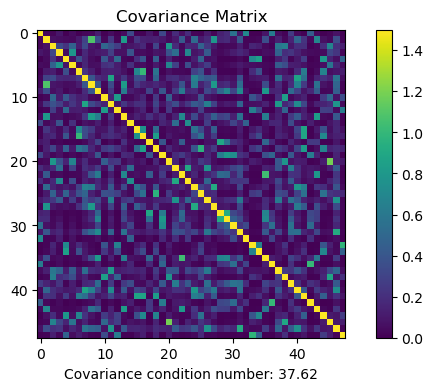
Below is the covariance matrix that illustrates the covariance between specific points. This matrix is generated using the covariance function.
General notes
-
the GeoKrige package does not perform any validation regarding the logical correctness of the functions passed to the
VariogramModelclass -
the GeoKrige package verify whether the order and naming of the parameters in both functions are the same
-
there are no restrictions on the names & number of parameters. Users are free to use any names and include any parameters they prefer. However, it is crucial to ensure that the first parameter represents a distance value!